
In This Article
Businesses are dealing with more data than ever. Invoices, contracts, customer records, emails, forms, spreadsheets, reports, and application data are constantly moving between teams and systems.
Collecting that data is the easy part; making it actionable is where the friction begins.
Many US businesses still spend critical time manually extracting document details, syncing disconnected systems, and fixing preventable errors. As data volumes surge, managing these workflows by hand becomes unsustainable.
This is where AI is changing the way businesses approach data automation solutions.
Traditional automation was built mainly around fixed rules. If the input followed the expected format, the flow worked. When a document changed layout or an unexpected data value appeared, someone usually had to step in.
AI-powered automation brings more flexibility to these workflows. It can help interpret unstructured information, identify patterns, classify documents, validate data, and route exceptions while traditional automation continues to handle predictable tasks.
The result is not simply “more automation.” It is a more connected way to capture, process, validate, and transfer data across an organization.
For businesses looking to modernize these processes, AI data automation services can turn repetitive data workflows into more scalable and intelligent operations.
What Is Data Automation?
Data automation refers to using technology to reduce manual work involved in collecting, extracting, processing, validating, transforming, and transferring data.
A simple example is automatically moving customer information from a web form into a CRM. A more advanced example could involve receiving invoices from different sources, extracting the relevant information, checking it against business rules, and sending validated data into an accounting system.
Data automation can combine traditional software rules, APIs, workflow automation, machine learning, and AI depending on the requirements.
This is important because not every process needs AI.
Structured and predictable data can often be handled efficiently with conventional automation. AI becomes particularly useful when workflows involve documents, natural language, images, inconsistent formats, or other information that is difficult to manage with fixed rules alone.
From Rule-Based Automation to AI-Powered Workflows
For years, businesses have used scripts, scheduled jobs, APIs, and workflow tools to automate repetitive data tasks. These approaches remain useful and are still an important part of modern data operations.
The challenge comes when the data itself is unpredictable.
Consider an accounts payable team processing invoices from hundreds of vendors. Each vendor may use a different invoice layout, field order, naming convention, or document format. A workflow designed around one fixed template can quickly become difficult to maintain.
AI can make the process more adaptable.
Instead of fixed positions or predefined formats, intelligent systems can use context to identify information and determine how to process it.
This can support several areas of the workflow.
Intelligent Data Extraction
AI-powered extraction can identify information from documents such as invoices, purchase orders, contracts, application forms, receipts, and statements.
Rather than requiring every document to follow the same layout, intelligent extraction can identify relevant fields based on their context.
For example, an invoice automation workflow may need to identify:
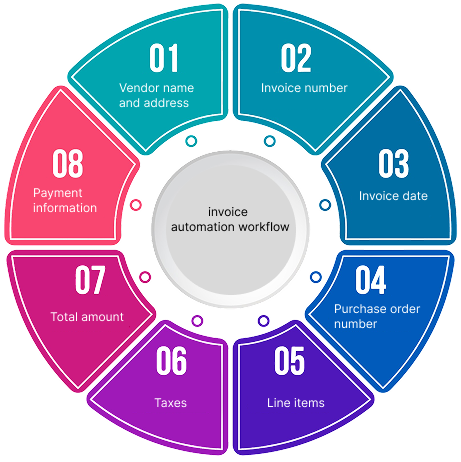
The extracted information can then move into the next stage of the workflow without requiring manual effort.
AI can detect unusual patterns, while traditional validation rules can continue to handle known requirements.
When a record requires additional attention, it can be sent to a person for review instead of allowing an uncertain result to move further through the system.
Data Integration Across Business Systems
Most enterprises do not keep all of their information in one place.
Customer information may live in a CRM. Financial data may sit in an ERP. Operational information may be stored in databases or cloud platforms. Documents may be scattered across email inboxes, shared drives, and other repositories.
This creates another important role for data automation: connecting these systems.
Automated workflows can capture information from one source, transform it into the required format, validate it, and send it to another system through APIs or other integration methods.
This automates routine data transfers, replacing tedious manual copy-pasting between systems.
The Key Components of Modern Data Automation
A strong data automation workflow is usually more than a single tool. It is a connected process that takes information from its source through processing and validation to its final destination.
1. Automated Data Capture and Ingestion
The first step is getting data into the workflow.
Depending on the business process, information may come from:
- PDFs and scanned documents
- Emails and attachments
- Online forms
- Websites
- Spreadsheets
- Databases
- APIs
- CRM and ERP systems
- Cloud storage
- Other structured and unstructured sources
Automated data capture reduces the amount of manual effort required to collect this information and prepare it for processing.
2. Intelligent Extraction and Classification
Once information enters the workflow, AI can help determine what the data contains and how to utilize it.
For document-heavy processes, this may involve identifying whether a file is an invoice, contract, purchase order, receipt, or application form and then extracting the relevant information.
This is particularly valuable when organizations process large volumes of documents that do not follow a single standardized template.
3. Data Processing and Transformation
Raw information often needs to be cleaned and standardized before it can be used.
Automated data processing can include:
- Data cleansing
- Normalization
- Deduplication
- Classification
- Validation
- Data enrichment
- Format conversion
- Schema mapping
These steps help create more consistent data for business applications, reporting, analytics, and AI systems.
4. Human-in-the-Loop Validation
AI does not have to replace human review.
In many enterprise workflows, the better approach is to let automation handle high-volume, predictable work while people focus on exceptions and decisions that require additional judgment.
For example, if an automated system is confident about most invoice fields but encounters an unusual value, that record can be routed to a reviewer.
This human-in-the-loop approach provides a quality and control layer for business-critical workflows.
5. Integration and Workflow Delivery
After information has been processed and validated, it needs to reach the system or team that will use it.
The workflow may:
- Update a CRM
- Send information to an ERP
- Load data into a warehouse
- Update a database
- Trigger another business process
- Send data through an API
- Prepare information for reporting or analytics
This is where individual automation tasks become part of a complete business workflow.
How Data Automation Helps Modern Enterprises
The value of automation goes beyond saving employees a few hours each week.
When repetitive data processes are designed properly, they can improve the way an organization operates as a whole.
Reduce Repetitive Manual Work
Employees often spend significant time entering information, checking records, moving data between systems, and correcting simple errors.
Automating these repetitive tasks allows teams to spend more time on work that requires business knowledge, analysis, communication, and decision-making.
Handle Growing Data Volumes
Manual processes can become bottlenecks as a company grows.
A workflow that works reasonably well with a few hundred records may become difficult to manage when the volume reaches thousands or millions.
Automation increases processing capacity without relying entirely on additional manual effort.
Improve Data Consistency
When people perform the same task manually, differences in how they interpret or enter information are almost inevitable.
Automated workflows can apply consistent processing and validation rules across large volumes of data.
This can help reduce inconsistencies and create more reliable information for downstream systems.
Support Better Analytics
Analytics teams need clean and accessible data before they can produce useful insights.
Automated workflows can help capture, clean, standardize, and deliver information to analytics environments more efficiently.
In this sense, data automation and data analytics work together. Automation helps prepare and move the data, while analytics helps businesses understand what that data means.
Make Operations Easier to Scale
Growing companies often face a familiar problem: more customers and transactions create more data, but increasing manual headcount at the same pace is not always practical.
Well-designed automation can provide additional processing capacity while keeping workflows consistent.
This makes automation particularly valuable for businesses dealing with recurring, high-volume data operations.
Common Data Automation Use Cases
Data automation can support a wide range of business processes. The right use case depends on the type of data, the volume involved, and the business outcome the organization wants to achieve.
Document Processing
Businesses can automate parts of the process involved in capturing and structuring information from invoices, contracts, forms, receipts, statements, and other documents.
Financial Data Processing
Finance teams can use automation for activities such as invoice data capture, transaction processing, reconciliation support, and preparation of structured financial information.
Customer and CRM Data
Automated workflows can help capture, clean, standardize, enrich, and transfer customer or lead information between different systems.
E-Commerce and Product Data
Businesses with large product catalogs can automate product data collection, normalization, categorization, enrichment, and synchronization.
Data Preparation for AI and Analytics
AI and analytics initiatives depend on usable data.
Automation can support recurring data preparation activities such as classification, validation, transformation, enrichment, and quality checks before information reaches analytical or AI systems.
Healthcare and Other Data-Intensive Operations
Organizations that handle large volumes of records and documents can use automation to reduce repetitive data processing while maintaining appropriate validation, security, and human-review controls.
The specific implementation will depend on the organization’s systems, data types, security requirements, and regulatory obligations.
How to Build a Practical Data Automation Strategy
Successful automation usually starts with the business process, not with the technology.
Before choosing a platform or AI model, organizations should understand where automation can create a measurable improvement.
1. Find the Right Processes to Automate
Look for processes that involve repetitive, high-volume work.
- Good candidates often include
- Manual data entry
- Repeated document processing
- Spreadsheet-heavy workflows
- Manual data validation
- Copying information between systems
- Recurring data transformation
- High-volume classification
The goal is not to automate everything. It is to identify processes where automation can make a meaningful difference.
2. Understand the Data
Determine whether the process involves structured, semi-structured, or unstructured information.
If the inputs are highly predictable, conventional automation may be sufficient. If the workflow involves documents, natural language, images, or changing formats, AI may provide additional value.
3. Set Clear Quality Requirements
Before implementation, define what “good” looks like.
Consider:
- Accuracy requirements
- Validation rules
- Exception handling
- Human review
- Security controls
- Audit requirements
- Processing time
- Data retention requirements
This helps prevent automation from simply moving problems further down the workflow.
4. Connect Automation to Existing Systems
The best automation is rarely an isolated process.
Consider how the workflow will interact with the systems your teams already use, including CRM platforms, ERP systems, databases, cloud storage, APIs, data warehouses, and analytics platforms.
Integration should be part of the strategy from the beginning.
5. Start Small and Expand
Organizations do not need to automate every process at once.
A better starting point is often one high-volume workflow with a clear business problem and measurable outcome.
Once the workflow has been tested and refined, the same approach can be extended to other processes.
What Comes Next for Data Automation?
AI is making data automation more capable, but the direction of enterprise automation is not simply about removing humans from workflows.
The more practical shift is toward combining AI, traditional automation, business rules, data integration, and human oversight.
That combination can handle repetitive work while people remain involved where context, judgment, and accountability matter.
This is becoming increasingly important as businesses connect AI to real operational systems. AI governance, risk management, transparency, and reliability are also important considerations when organizations deploy AI in business workflows, as outlined in the NIST AI Risk Management Framework.
In other words, successful AI adoption is not only about choosing a powerful model. It also depends on having the right data and building reliable workflows around it.
The Future of Enterprise Data Workflows
AI is changing what businesses can expect from data automation.
Instead of relying entirely on rigid rules and manual intervention, modern data automation solutions can combine intelligent extraction, automated data processing, validation, integration, and human review to handle increasingly complex workflows.
For US leaders, success isn’t about automating every task just because the technology exists. It’s about targeting the repetitive bottlenecks that stall your teams, streamlining how information flows across your enterprise, and building pipelines designed to scale naturally with growth.
The strongest automation strategies start with a real operational problem, use AI where it adds value, and connect automation to the systems and processes the business already relies on.
By removing manual overhead with tailored data automation solutions, enterprises set the stage for long-term growth. Explore how Inputix designs custom pipeline architectures to optimize your data workflows today.